
We Measured the Finca Flichman Migration: What a Site Gains by Leaving WordPress for Next.js
When we migrated Finca Flichman from WordPress to Next.js, we said the site would end up faster. A year later we decided to stop saying it and start measuring it: we restored the original WordPress, brought it back up exactly as it was, and ran it through Lighthouse against the version live in production today.
This article is that experiment. The numbers are reproducible and the methodology is below.
How we measured it
We didn't compare against a memory or an old screenshot. We restored the whole site:
- The cPanel backup of the original account: the WordPress files, the theme, the plugins and the entire media library.
- The database exported from the production server, imported without touching the content.
- All of it running in Docker with Apache and PHP, with URLs rewritten to the local host through WP-CLI so the site behaved exactly as it did in production.
The result is the same WordPress visitors used to see: WordPress 6.9, the Salient theme, WPBakery Page Builder and WPML for multilingual support.
Against that we measured flichman.com.ar as it stands today, in production.
Every measurement is the median of three Lighthouse runs on the mobile profile, the one Google uses for ranking. Lighthouse simulates the network — a slow mobile connection — for both sites, so what gets compared is each site's code and payload, not where it happens to be hosted.
What WordPress carried on every visit
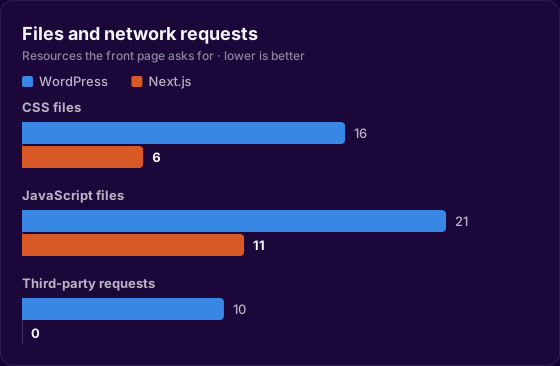
Before looking at timings, the inventory is worth a look. To paint its front page, the Flichman WordPress requested:
- 16 separate CSS files. One for the base theme, one for the grid, one for the header, one for elements, one for responsive, one for Flickity, one for Select2, one for FancyBox, one for FontAwesome, one for WPBakery… every plugin and every theme module added its own stylesheet, and the browser had to download all of them before painting.
- 21 JavaScript files, including jQuery, jquery-migrate, FancyBox, Select2 and an 82 KB theme
init.js. - 96 KB of FontAwesome alone, a complete icon typeface loaded to use a handful of icons.
- 10 requests to third-party servers to pull fonts from Google Fonts, each with its own DNS lookup, its own TLS handshake and its own latency.
- And on every single visit, PHP querying MySQL to assemble a page that almost never changes.
That's the real cost of a plugin architecture: nobody chose to load sixteen stylesheets. They accumulated.
The results
The first thing a visitor sees is the first thing that changed:
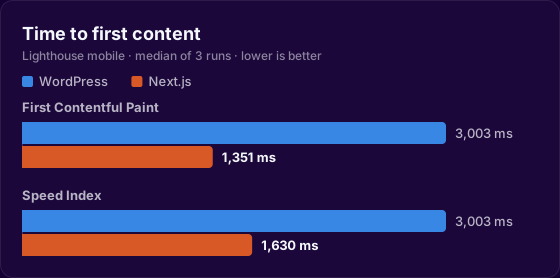
Lighthouse mobile, median of three runs:
| Metric | WordPress | Next.js | Difference |
|---|---|---|---|
| First Contentful Paint | 3,003 ms | 1,351 ms | −55% |
| Speed Index | 3,003 ms | 1,630 ms | −46% |
| Server response time | 105 ms | 7 ms | −93% |
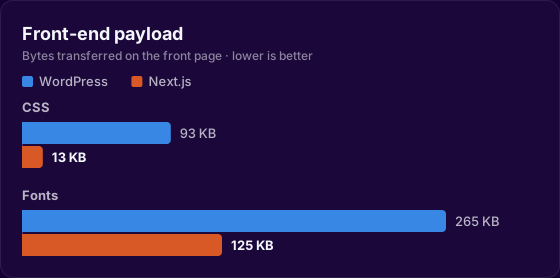
| CSS transferred | 93 KB | 13 KB | −86% |
| CSS files | 16 | 6 | −62% |
| JavaScript files | 21 | 11 | −48% |
| Fonts | 265 KB | 125 KB | −53% |
| Third-party requests | 10 | 0 | −100% |
| Main-thread work | 889 ms | 819 ms | −8% |
The biggest difference is in what the browser has to download before it can paint anything:
On desktop the trend repeats: first paint drops from 643 ms to 362 ms (−44%) and server response from 97 ms to 6 ms (−94%).
Lighthouse's quality scores moved as well:
| Category | WordPress | Next.js |
|---|---|---|
| SEO | 92 | 100 |
| Best practices | 77 | 100 |
| Accessibility | 84 | 91 |
That perfect best-practices score isn't cosmetic: it means the site stopped shipping libraries with known vulnerabilities, console errors and deprecated APIs that came bundled with the plugin ecosystem.
Why it got faster
Three architectural changes explain almost all of it.
HTML stops being manufactured on every visit. WordPress boots PHP, queries MySQL, runs the theme and the plugins, and only then sends the first byte. Next.js generates the pages once, at build time, and serves them as static files from the edge. Hence server response dropping from 105 ms to 7 ms: there is nothing left to compute, only something to hand over.
CSS goes from an accumulation to a decision. With Tailwind, the final stylesheet contains only the classes the site actually uses. There are no leftover styles from a plugin someone installed and never removed, and no entire icon typeface for five icons. 93 KB across sixteen files became 13 KB across six.
Third parties leave the critical path. Fonts are now served from the same domain as everything else, self-hosted and with font-display: swap. Ten requests to somebody else's servers — with their DNS, their TLS handshake and their latency — became zero. Beyond speed, that's a privacy win: a visitor's IP address no longer travels to a third party just to read the page.
What the business takes away
First-impression speed is not a vanity metric. On mobile, on the network most people actually have, the difference between seeing content at 3 seconds and at 1.3 is the difference between staying and hitting back. And since 2021 Core Web Vitals have been a ranking signal Google states openly: a site that responds in 7 ms and ships fewer bytes competes better for the same searches.
For Flichman it also meant a smaller maintenance surface. No plugins to update every week, no urgent security patches, no admin panel exposed to the internet.
Do you have a WordPress that turned slow and expensive to maintain? At Lykos this is exactly the work we do: measure first, migrate second, then measure again. Let's talk.